OrangeIDE

// agentic coding · windows x64 · free & offline

Your code never
leaves your machine.

A complete agentic coding IDE that runs open models on your own GPU with a built-in llama.cpp engine. No account, no cloud, no telemetry, and no server of ours anywhere in the path. Prefer a cloud model? Paste your own key and it goes straight to the provider — never through us.

  • Runs 100% offline
  • No account, ever
  • Portable — lives on a USB drive
  • Free, with no paid tier
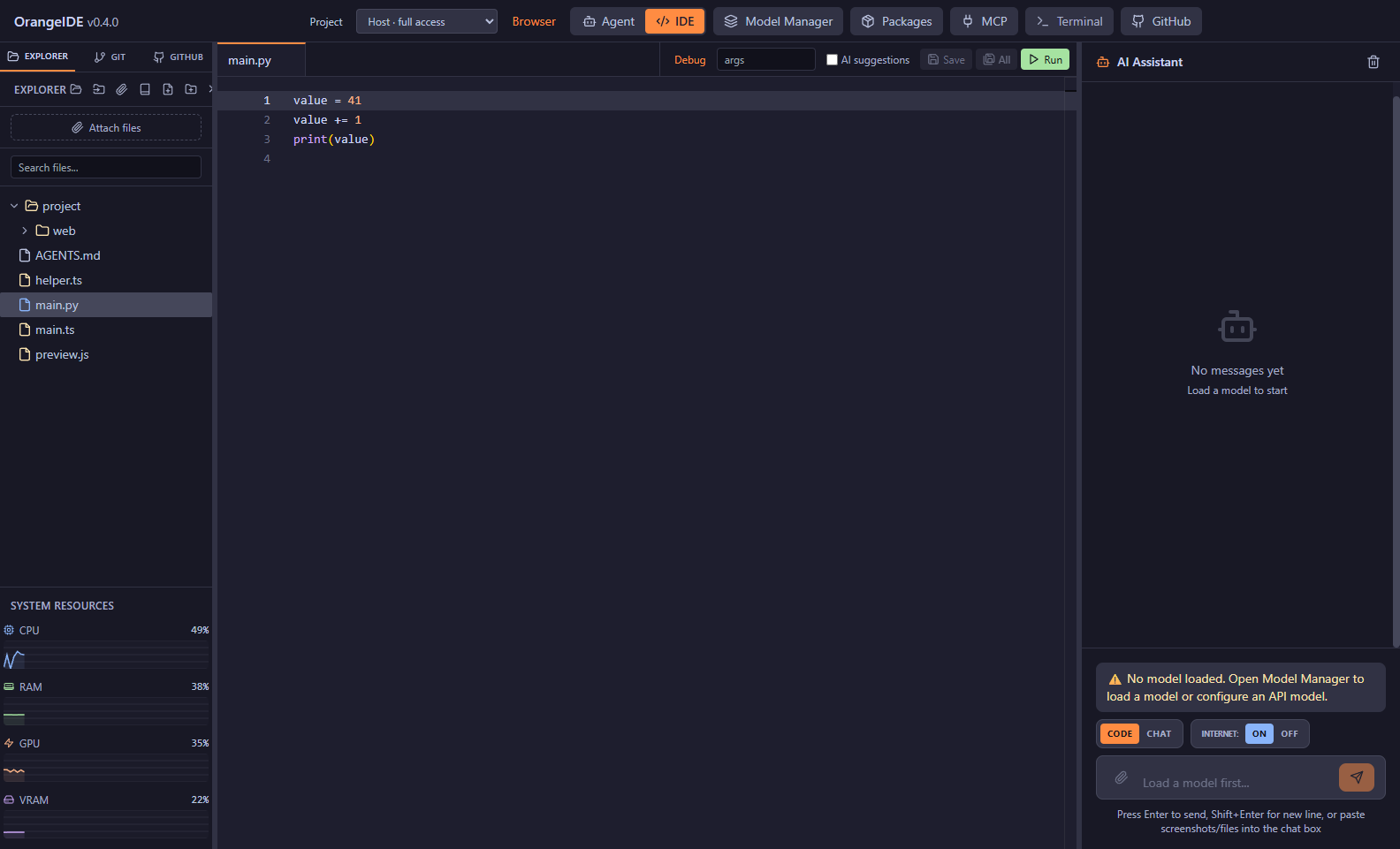
OrangeIDE with a Python file open: file explorer on the left, syntax-highlighted editor in the centre, AI assistant panel on the right, and live CPU, RAM, GPU and VRAM meters.
OrangeIDE 0.4.0 editor and Python debugger. Version 0.4.1 adds a browser side pane.

// choosing a model

Local by default. Cloud only if you say so.

Most AI IDEs start in the cloud and treat local as an afterthought. OrangeIDE is built the other way up — and never puts itself between you and a provider.

DEFAULT · LOCAL

Your GPU does the work

A bundled llama.cpp engine runs open models — DeepSeek, Qwen, Llama, GPT-OSS — straight from Hugging Face. Pick a quant, and the autotuner splits layers across GPU and RAM for your exact hardware.

Chat, agent mode, RAG, terminal: all of it works with the network cable unplugged.

free forever · offline forever
OPTIONAL · YOUR KEYS

Bring any provider

Paste your own API key for OpenAI, Anthropic, Google, DeepSeek, Grok, and more. Calls go straight from your machine to the provider — we never proxy them, never see them, never charge for them.

Bring-your-own-key is a feature here, not a business model.

free feature · direct connection
OPTIONAL · ONE KEY

Don't want eight accounts?

Point OrangeIDE at an aggregator like OpenRouter and a single key reaches hundreds of models. Billing stays between you and them — we take no cut and never see the traffic.

There is no OrangeIDE account, balance, or gateway. There never will be.

optional · your key, your billing

// hardware fit

What can your machine run?

Pick your specs for an honest starting point — the same logic the in-app autotuner uses. Mixture-of-experts models punch well above their VRAM tier, which is why a 12 GB card can run a 35B.

# real GGUF file sizes · speeds measured where a public benchmark exists, estimated otherwise · checked Aug 2026

Qwen3.5-9B

UD-Q4_K_XL · 5.97 GB download

expected speed
~25–35 tok/s
comfortable context
32k–64k tokens
agent mode
yes — the best under 10 GB

The sweet spot for an 8 GB card: fits entirely in VRAM and is the strongest tool-caller available in single-digit billions.

⚠ 8 GB system RAM is below the 16 GB minimum — expect heavy swapping.

// the ide

A complete IDE, not a chat window.

Editor, debugger, browser, terminal, Git, and a local coding agent — in one portable install.

Agent mode

An autonomous loop that plans, edits, runs your tests, and verifies its own work — with an autonomy dial from read-only to hands-off and a live plan you can steer.

Model Manager

Search Hugging Face in-app, compare quantizations, download multi-part GGUFs, and let the autotuner pick GPU layers and context for your card.

Local RAG

Index your own PDFs, DOCX, and docs into a local knowledge base the agent can search. Your documentation never leaves the disk it lives on.

Terminal, git & GitHub

An integrated shell that follows your file explorer, plus commit, branch, and PR panels the agent can drive with your permission.

MCP servers

Extend the agent with Model Context Protocol tools — browsers, databases, custom scripts — managed from a built-in MCP panel.

Portable mode

Drop the folder on an external SSD and the whole IDE travels — models, config, sessions, keys. It even heals drive-letter changes between machines.

Project-aware editing

Complete, navigate, and rename symbols across Python, JavaScript, and TypeScript projects. Debug Python with breakpoints, stepping, and variable inspection.

Recoverable task work

Review edit checkpoints, catch file conflicts, and keep task history across restarts. Use optional Git worktrees to give a task its own working copy.

Built-in browser

Browse beside your code in a resizable pane that stays closed until needed. Give the model browser instructions, work with the current page, and keep tabs open across turns.

// what it costs

Free. Not freemium.

Free for individual use — no account, no licence key, and nothing held back for a Pro edition. That's sustainable rather than a bait-and-switch, for a fairly boring reason:

Your hardware does the work

Inference runs on your GPU and your electricity. An extra user costs us nothing, so there's no meter to run and no reason to install one.

There is no server

Nothing to host, nothing to keep online, nothing to bill for. The only running costs are a domain and the bandwidth to hand you the download.

Nothing to switch off

No licence check, no activation server, no phone-home. The copy you download keeps working whatever happens to us, so there is no lock-in to price against later.

// for organisations

Commercial and air-gapped licensing

Deploying OrangeIDE across a team, or somewhere source code legally cannot leave the building? We can help with larger deployments — licensing, setup, and ongoing support. Reach out and we'll put together a quote.

  • Site and per-seat commercial licensing
  • One shared inference server for the whole team
  • Fully air-gapped and offline-installer deployment
  • Centrally managed configuration and tool policy
  • Agent audit logging for review and compliance
  • Signed builds and SBOM for security review
  • Support agreements and response commitments
Talk to us about licensing

// in writing

Promises we can be held to.

Trust claims are cheap. These are specific enough that you could catch us breaking them.

terminal
cat PROMISES.md
  1. Your code never reaches us. There is no OrangeIDE server in any path — not for local models, not for your own API keys. There is nothing to reach.
  2. No account, for anything. Downloading, installing, and using every feature requires no sign-up.
  3. API keys stay on your disk. They are sent only to the provider they belong to, directly from your machine.
  4. Telemetry is off, and there is none to turn on. The app does not phone home.
  5. The app never expires. No licence check, no activation, no kill switch. If this project stops tomorrow, your copy keeps working forever.
  6. Checksums are published for every release, so you can verify what you downloaded is what was built.

// download

Get OrangeIDE 0.4.2

One download, batteries included: the inference engine, a Python and Node runtime, and the agent's whole toolbelt ship in the box. That's why it's big.

Portable ZIP · Windows x64

OrangeIDE-Portable-0.4.2.zip · 1.58 GB

Unzip anywhere — including an external SSD — and run OrangeIDE.exe. No installer, no registry entries, no admin rights. Config, models, and sessions all live inside the folder you unzipped.

Download · 1.58 GB

Windows will warn you

SmartScreen will say the publisher is unknown, because the build isn't code-signed yet. Click More info, then Run anyway. This is expected — not a sign anything is wrong with your download.

Signing is on the list. Worth knowing it wouldn't remove that prompt immediately either: Windows builds trust per-file over many clean installs, so a new signed app gets warned about too.

SHA-256
2d44839a06fd443a748c5dd08dd9c0f4ec0e3fd3bedac602127d5a0fbab6e829

Get-FileHash .\OrangeIDE-Portable-0.4.2.zip
  • OS Windows 10/11 x64
  • RAM 16 GB min · 32 GB recommended
  • GPU NVIDIA CUDA optional — CPU works
  • Disk 10 GB + whatever your models need

# no installer yet — the portable build is the whole product · macOS & Linux are not supported today

What’s new

v0.4.2 · current release · 11 September 2026

  • Protect your OpenRouter key. Model names entered in the API-key field are rejected before they can replace the credential shared by all your OpenRouter models.
  • Clearer provider setup. Separate API key and Model ID labels explain what belongs in each field. Leave the key blank when adding another model to keep the saved key.
  • Verified with live models. Restoring the correct shared key resolved the reported 401 error, with successful DeepSeek and Qwen responses in the running IDE.
  • Browser side pane included. The browser stays inside the IDE and opens only when you or the model requests it.
Earlier releases

v0.4.1

  • Browser in a side pane. Browse beside the editor or agent in the same IDE window. Resize the pane, keep multiple tabs, and inspect pages with developer tools inside the pane.
  • Closed until needed. The pane opens when you click Browser or an HTML file's Open button, or when the model requests browser work. Saved sessions, HTML edits, server output, and background popups leave it closed.
  • Give the model browser instructions. Use the pane's request box, Code chat, or your Agent conversation to work with a page. The model can read, click, type, select options, press keys, scroll, and navigate.
  • Keep going across turns. Closing the pane preserves its live tabs, and agent follow-ups retain access to their pages. You can hand the current page to the model through the pane's request box.

v0.4.0

  • Editing and debugging built in. Python, JavaScript, and TypeScript gain language services for completion, navigation, and project rename. Python debugging adds breakpoints, stepping, and variable inspection.
  • A browser inside the IDE. Open multiple tabs, preview local websites with their scripts and assets, search pages, open DevTools, and capture screenshots or page context for the agent.
  • Changes you can review and recover. Structured edit checkpoints detect conflicts before overwriting changed files. Optional Git worktrees keep task changes in their own checkout, with task history and explicit continuation after a restart.
  • More useful project context and verification. Code indexing and scoped project instructions help the agent navigate the repository. Verification recognises more project test commands and records the results.
  • A stronger offline foundation. The editor and its workers are bundled locally. Local app connections require authentication, sessions gain recovery backups, and app-owned processes are cleaned up on exit.

v0.3.10

  • A run can no longer end quietly on a context overflow. When a prompt outgrew the model’s context, the engine’s error was dropped and the run finished as if done, with an empty reply. It now shows as the error it is.
  • Overflows are caught before they happen. The context check never counted the tool definitions sent with every request — about 3,000 tokens — so prompts that should have been summarised first reached the engine instead. They are counted now, and the context gauge shows the real figure.
  • A one-line sign-off no longer ends the run. The recovery nudge only fired on long replies; a short “let me know if you’d like me to continue” slipped past it. It now fires on any reply, up to three times a run.
  • The parallel-sessions warning gives advice you can act on. It pointed at a slot control that doesn’t exist; it now names the real setting and its cost.

v0.3.9

  • Drag and drop files straight in — one file or a whole selection, anywhere in the agent view, the chat, or the file explorer.
  • Attachments are scoped to the file: a document from Downloads gives the agent that document, not the rest of Downloads.
  • Attached files survive a restart and show in a list you can open, remove, or clear.

v0.3.8

  • Fixed an error that interrupted every streamed reply from providers that send a usage frame at the end of a response.
  • A tool that fails — an unreachable URL, a PDF it can’t read — no longer ends the whole run.
  • Stop is its own button now, and stays available whenever the model is actually generating. Esc stops too.

v0.3.7

  • Added abliteration.ai as an API provider, alongside the existing ones.

v0.3.6

  • Optional diagnostic logging you can switch on and send in when something breaks. API keys are stripped before anything is written to disk.

v0.3.5

  • Running several agents at once got honest: sessions that need you sort to the top, approvals name the tool they belong to, and the UI says when agents are queued behind a single local inference slot rather than truly running in parallel.
  • Live tokens-per-second readout next to the context gauge, for both local and API models.

v0.3.3

  • MCP server support, parallel agent sessions, and portable export/import of API keys so a new install doesn’t mean retyping them.

// get in touch

Questions, bugs, or a deployment that can't touch the cloud.

Questions, bug reports, and commercial licensing enquiries all land in the same inbox. Every message is read; please allow a little time for a reply.

// no tracking, no mailing list, no third-party form service — it goes to one inbox

// faq

Fair questions.

Does it really work fully offline?

Yes. Download a model while you have a connection, then unplug. The editor, local-model chat and agent mode, local RAG, terminal, Git, and local website previews work on your own machine. Cloud models, external websites, GitHub, and new model downloads need a connection.

What's the catch? Why is it free?

There isn't one, and the reason is unglamorous: inference runs on your GPU, so an additional user costs almost nothing to serve. There's no hosted service behind it to fund, which is exactly why individual use can stay free without a countdown attached. Revenue comes from commercial and air-gapped licensing for organisations — see what it costs.

Do I need an account?

No — not to download, not to install, not for any feature. There is no sign-up anywhere in the product.

Where do my API keys live?

On your machine, in OrangeIDE's local config folder — in portable mode, inside the folder you carry. Each key is sent only to the provider it belongs to, directly from your computer. They are never transmitted to us, because there is no "us" in the network path.

Do you ever see my code?

Never. There is no OrangeIDE server anywhere — not for local models, not for cloud models via your own key. Nothing to see it with.

Why does Windows warn me about the publisher?

Because the build isn't code-signed yet. A signing certificate requires a registered business entity and an annual fee, and it's on the list rather than done. Until then, SmartScreen will flag it as an unknown publisher — verify the published SHA-256 against your download if you want certainty about what you got.

What happens if you stop working on this?

Your copy keeps working, permanently. There's no licence check, no activation server, and no phone-home — nothing that can be switched off remotely. Whatever version you have on disk runs until Windows itself stops supporting it.

What hardware do I need?

Windows 10/11 x64 with 16 GB of RAM minimum. An NVIDIA GPU makes local models substantially faster, but CPU-only works if you're patient. Use the "What can your machine run?" picker above for an honest starting point.

Is there a macOS or Linux build?

No. Windows x64 only today. The bundled runtime — llama.cpp binaries, Python, Node — is all built for Windows, so ports aren't a recompile away.